


- All Products
- ██ 01 LAN Cable Extender
- ▍ HDMI Extender
- ▍ 4K HDMI Extender
- ▍ DVI Extender
- ▍ VGA Extender
- ██ 02 Wireless Extender
- ██ 03 Fiber Extender
- ▍ HDMI Extender
- ▍ SDI Extender
- ▍ VGA Extender
- ▍ DP Extender
- ██ 04 Audio Extender
- ██ 05 XLR Audio Series
- ██ 06 Splitter
- ██ 07 Converter
- ██ 08 Repeater
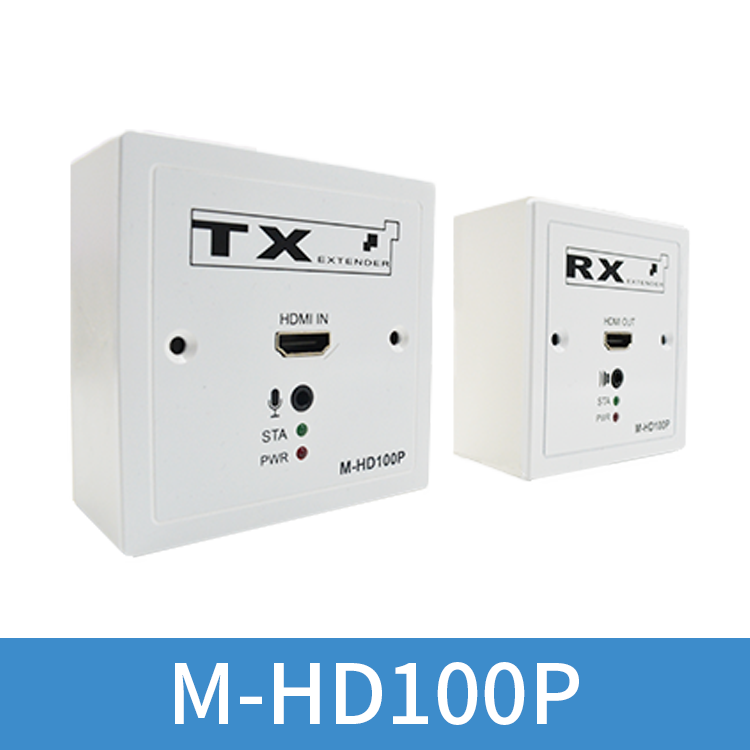
86 Panel HDMI Extender
【M-HD100P】
2.H.264 compression coding method is used to transmit HDMI video and audio signals, which can be connected in series through Power Over Ethernet
3.The standard TCP/IP protocol, can be combined with Ethernet POE switch to achieve one-to-many applications
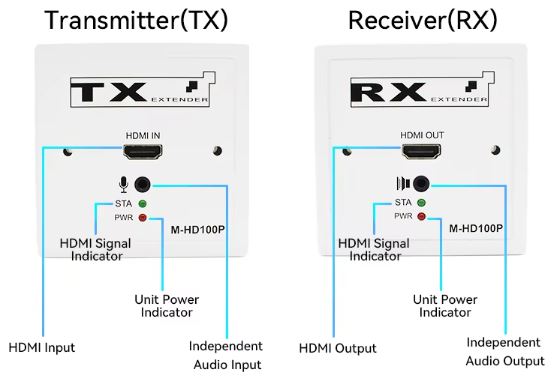
4.Support independent Audio; Video input/output
5.Compatible with HDMI 1.3 standard
6.Conform to HDCP 1.2 standard – high-bandwidth digital content protection technology
7.Can automatically identify and configure various display modes
8.Built-in automatic equalization system, the picture is smooth, clear and stable
9.Built-in ESD electrostatic protection circuit, comprehensive protection system safety
10.Simple and convenient installation, plug and play, no need to set up


M-HD100P (86 panel) extender adopts H.264 compression coding mode to transmit high-definition video signals over long distances with a single network cable. The sending end supports independent audio input, and the receiving end supports independent audio and video output. Can adapt to a variety of complex application environments. The device has excellent image processing and transmission capabilities, making signal transmission more smooth and stable, and is a reliable, high-performance and efficient HDMI signal extension method.

1、H.264 compression coding method is used to transmit HDMI video and audio signals, which can be connected in series through Power Over Ethernet;
2、Hd video signal resolution up to 1920*1080P@60Hz; 1600*1200@60Hz;
3、The standard TCP/IP protocol, can be combined with Ethernet POE switch to achieve one-to-many applications;
4、Support independent Audio;Video input/output;
5、Compatible with HDMI 1.3 standard;
6、Conform to HDCP 1.2 standard – high-bandwidth digital content protection technology;
7、Can automatically identify and configure various display modes;
8、Built-in automatic equalization system, the picture is smooth, clear and stable;
9、Built-in ESD electrostatic protection circuit, comprehensive protection system safety;
10、Simple and convenient installation, plug and play, no need to set up;



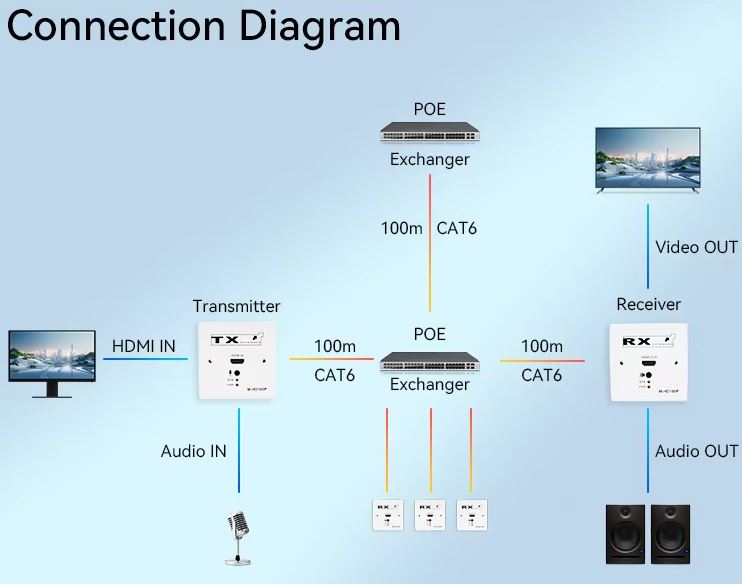
1、Check whether the switch has the POE function;Connect the sending end and the receiving end to the POE port through a network cable;
2、Connect the HDMI signal source to the sending end of the HDMI extender; Connect the network cable to the POE port of the POE switch;
Connect the receiving end of the HDMI extender to the display device (such as high-definition TV, splicing screen; projector, etc.); at the same time, connect the network cable to the POE interface of the POE switch;
4、Connect the POE switch to the power supply, when the indicator light is on normally (P is always on; S is always on;), the system is running normally

1.HDMI extender transmitter x1
2.HDMI extender receiver x1
3.The sending end has 3.5 to 6.5 conversion cables x 1
4.User manual x 1 copy